


Since its launch, Nano Banana has helped Gemini attract over 10 million new users, and has become the go-to image generation tool for a growing number of creators.
For users with long-term needs, however, subscribing directly to buy Gemini Pro or Ultra isn't cheap — starting at $19.99/month, the costs can really add up over time.
That's why we've put together this guide covering 6 ways to use Nano Banana, ranging from completely free to budget-friendly alternatives, so you can get the most out of it without breaking the bank.
What Is Nano Banana?
Nano Banana is Google's AI image generation and editing model, built into the Gemini app. It stands out for its character consistency and accurate rendering of real-world content, making it Google's flagship image generation tool within its ecosystem.
In August 2025, it appeared on LMArena as an anonymous model and racked up over 5 million votes in just two weeks, sending platform traffic soaring by 10x. Google subsequently revealed its identity and adopted the community-coined nickname "Nano Banana."
The model has gone through three versions to date:
Version | Official Name | Release Date | Description |
Nano Banana | Gemini 2.5 Flash Image | August 2025 | The original version, largely superseded |
Nano Banana Pro | Gemini 3 Pro Image | November 2025 | High precision, suited for professional use |
Nano Banana 2 | Gemini 3.1 Flash Image | February 2026 | Current default — faster, with quality close to Pro |
Most free access channels currently run on Nano Banana 2, while the Pro version remains available under select paid plans.n:
How to Use Nano Banana for Free or Less
The default way to access Nano Banana is through Google's Gemini app, but the free tier comes with a daily usage limit. If you need more, are considering a Gemini Pro subscription, or want to explore other ways to access it, here are 6 methods to consider.
They broadly fall into three categories: completely free (Gemini App, Google Search, AI Studio, Rita AI), budget-friendly alternatives (GamsGo), and a student discount that was once free but has since expired. Feel free to jump straight to whichever section fits your needs.
Gemini App — The Most Direct Route
The Gemini App is the most straightforward official way to access Nano Banana. If your usage needs aren't particularly high, it's also the most hassle-free option. Free users get 20 image generations per day, with Nano Banana 2 set as the default model.
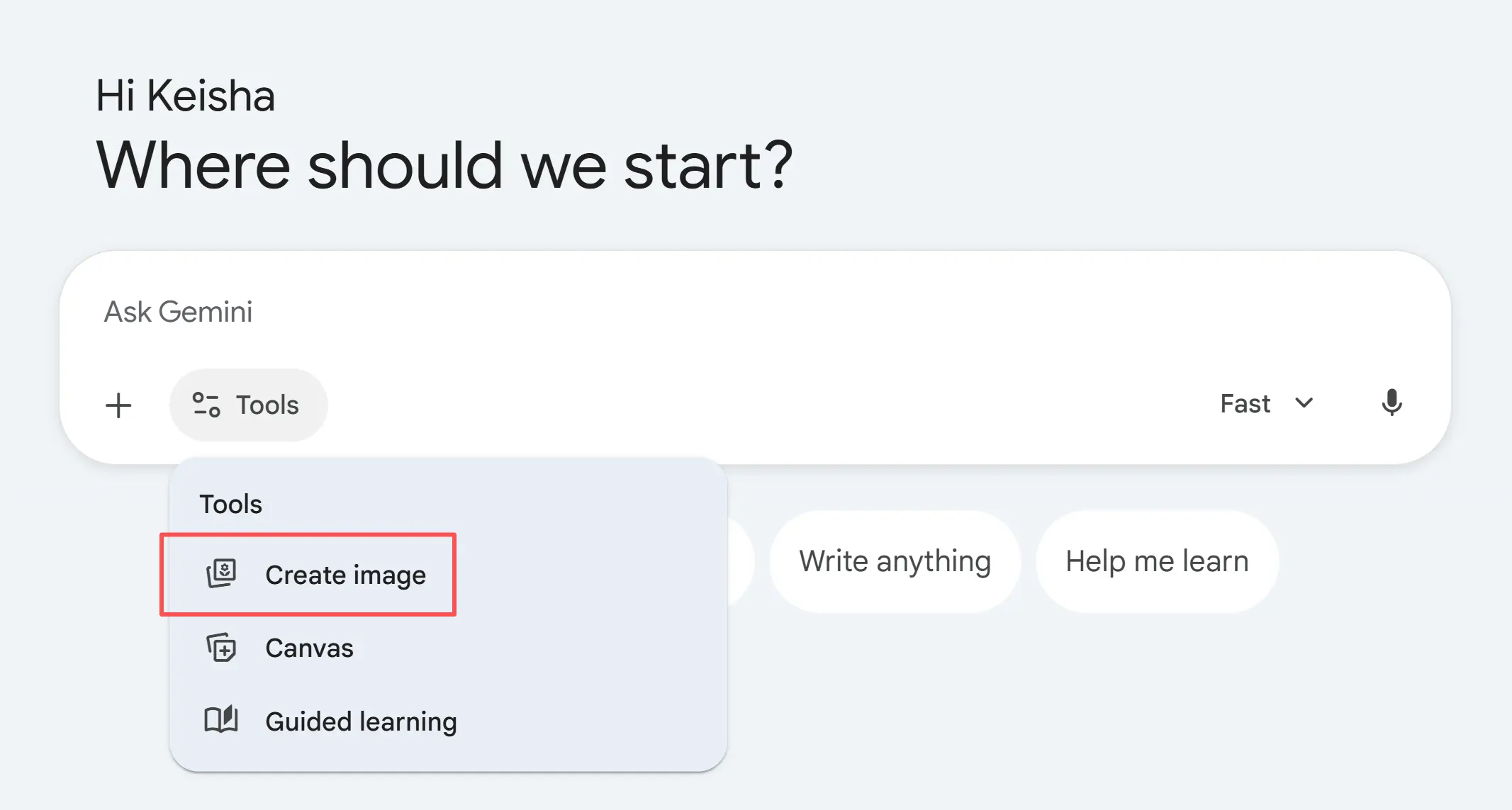
Getting started is simple — no extra account needed. Just sign in with your existing Google account, click the "Tools" button in the bottom-left corner of the input field, and select "Create image" to get started right away.
That said, if you generate images on a regular basis, the free tier's 20-image daily limit may start to feel restrictive. Compared to the other methods covered in this guide, subscribing directly to Gemini Pro is honestly the most convenient option.
In addition to bumping your daily Nano Banana 2 limit to 100 images, a Pro subscription also includes Deep Research, Veo video generation, 2TB of cloud storage, and more. For heavy users of the Google ecosystem, Gemini Pro is well worth it.
The only sticking point is the price — at $19.99/month, it's a tough sell if all you really want is image generation. If you see the value in Gemini Pro but don't want to pay full price, the secondhand account market offers a more cost-effective path in.
Accounts Marketplace — Buy Gemini Pro or Ultra on GamsGo
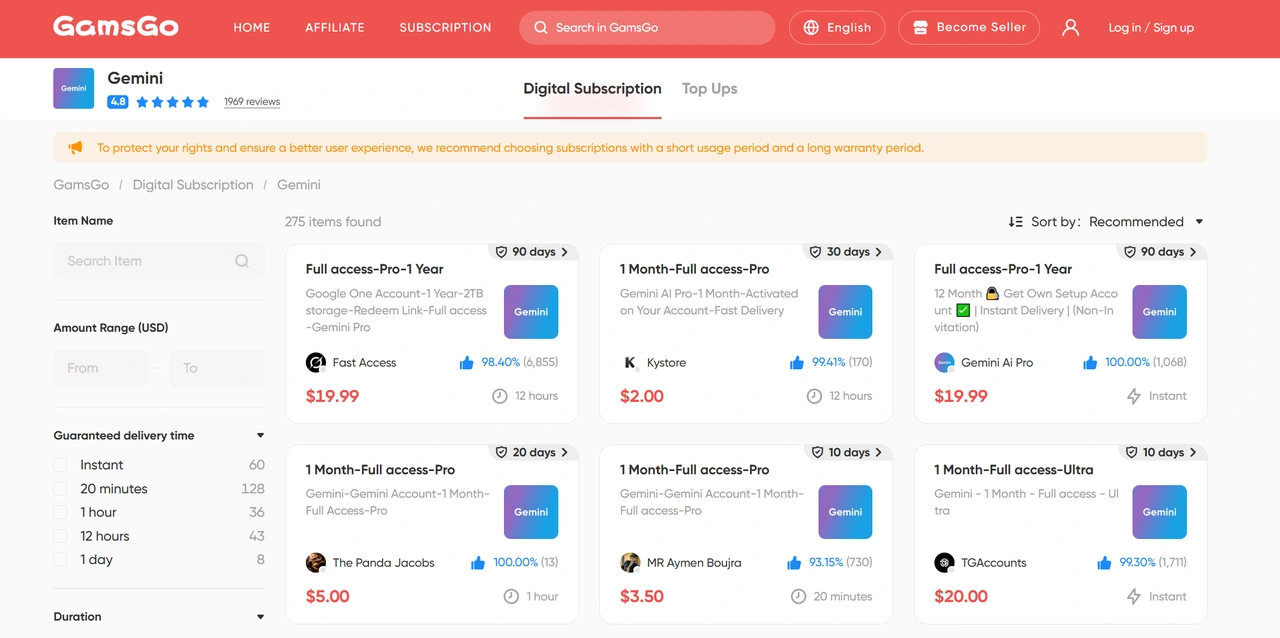
GamsGo is a well-established accounts marketplace with a streamlined process and a reliable verification system. The platform brings together a large number of vetted sellers offering a wide range of AI subscriptions — including Gemini — across plan tiers from Pro to Ultra, covering just about every use case.
Most of these accounts come from users with unused prepaid credit who choose to resell at a lower price. Going this route, you could end up paying as little as 40% of the official price for a Gemini Pro or Ultra subscription — making it one of the best value options out there for anyone who uses Nano Banana heavily.
The buying process is straightforward: create an account, find the Gemini plan that suits your needs, and complete the purchase. No complicated setup required — access is typically granted within minutes, letting you enjoy the full Pro experience at a fraction of the cost.
Google Search / AI Mode — Free & No Login Required
This is an image generation method that many people overlook. Beyond the Gemini App, Google Search itself now supports image generation — and it's even simpler to use. One thing to note: the image quota here is shared with the Gemini App, so free users have a combined total of 20 images per day across both entry points.
That said, it has two advantages worth highlighting. First, you don't need to log into a separate Gemini account — just type your prompt directly into the search bar to trigger it. Second, the underlying Nano Banana 2 is integrated with Google Search Grounding, which means it produces more accurate results than standalone tools when generating images involving real landmarks, brands, or trending cultural references.
There are currently three ways to access it:
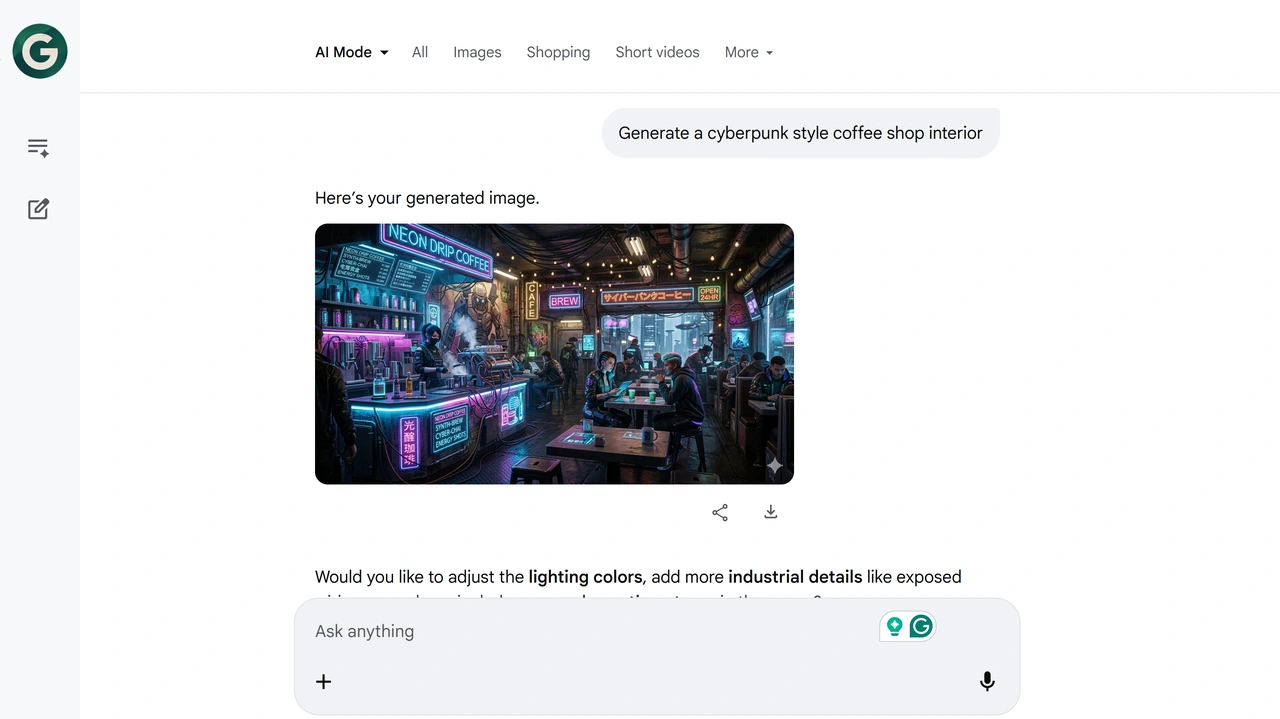
- Desktop: Go to google.com, type an image generation prompt into the search bar (e.g.
Generate a cyberpunk style coffee shop interior), then click the "AI Mode" tab at the top of the results page. The page will switch to a conversational interface and output the image you're looking for. - Mobile: Open the Google App. You'll see an "AI Mode" button just below the search bar — tap it to enter the chat interface, then type or speak your prompt.
- Direct search command: Type a sentence starting with
Draw...orCreate an image of...directly into the regular search bar. Google will display generated thumbnails at the top of the results, and clicking on one opens a full-screen editing mode.
Generated images support 4K download and come with an embedded SynthID AI watermark.
Google AI Studio — Power User's Choice
Google AI Studio (aistudio.google.com) is Google's free AI experimentation platform open to developers and creators. It lets you call various Gemini models directly in the browser, including Nano Banana 2.
To get started, go to AI Studio, select "Gallery" mode from the left sidebar, choose the Nano Banana 2 model, and type your prompt into the input box to start generating.
Honestly though, the AI Studio experience isn't for everyone. The interface is built with developers in mind — there are a lot of parameters, and the learning curve can be steep for casual users.
What's more frustrating is the lack of history: refresh the page or close the tab, and any images you've generated are gone. If you care about a smooth, reliable experience, subscribing to a paid Gemini plan is the better investment.
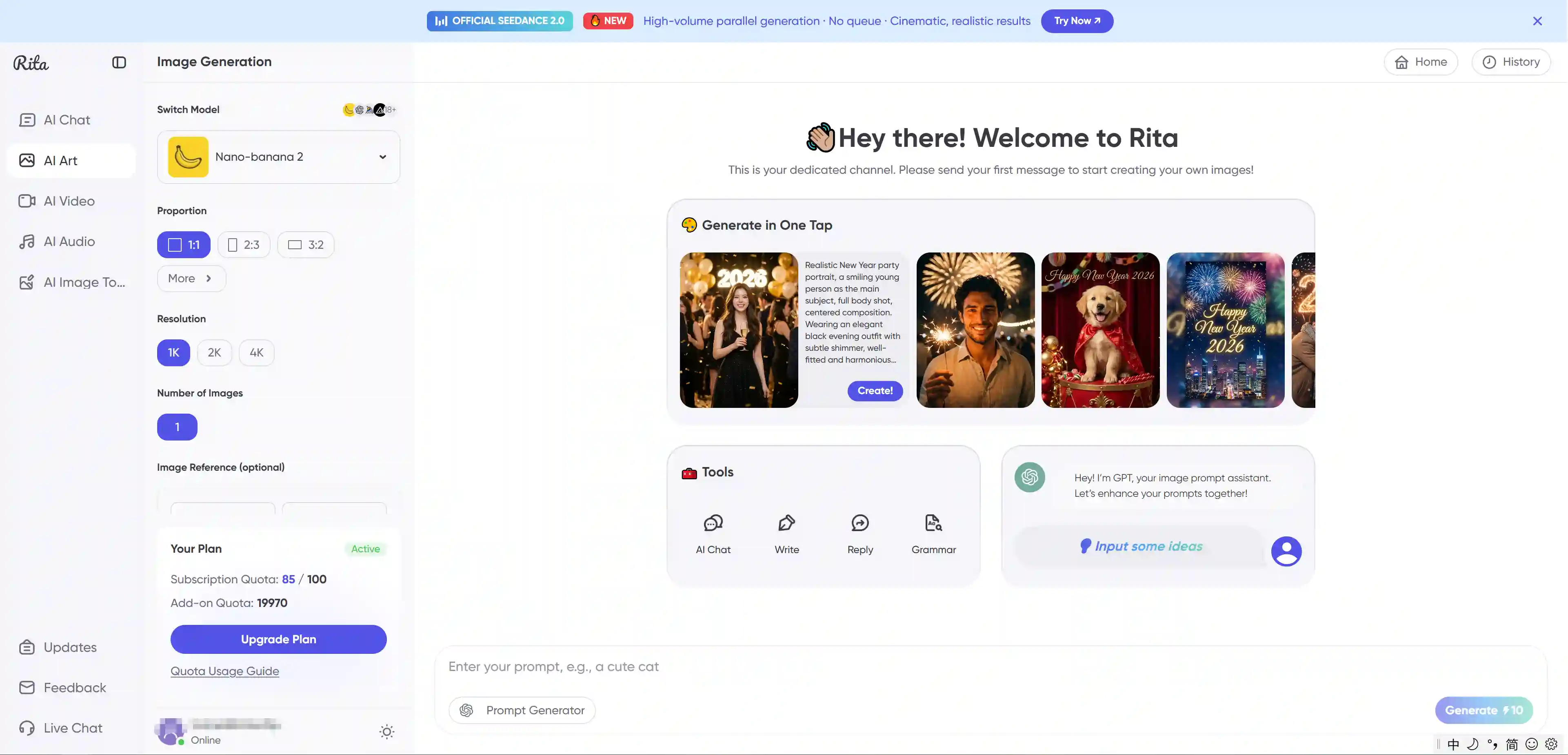
Rita AI — Partnering with Gemini to Provide Free Daily Quotas
Rita AI is a multi-model aggregator platform. New users receive 100 free credits upon signing up, which can be used directly to generate images with Nano Banana 2 — and the credits reset every day. For occasional Nano Banana users, this daily allowance is generally more than enough.
If you need more, the $6.99/month Pro plan covers 10+ mainstream image and video generation models, including Nano Banana Pro, Midjourney V7, Flux, Kling, Veo, and more. A standalone Midjourney subscription alone runs $10/month — Rita AI bundles all of these together at a lower price.
This platform is best suited for users who need access to multiple AI tools at once and don't want to manage separate subscriptions for each, while still having the flexibility to switch between different models whenever they need to.
Student Perk — How to Get Nano Banana Pro Free (Currently Expired)
Back in April 2025, Google ran a particularly generous promotion for college students in the US: with a verified .edu email address, eligible students could get 15 months of Google AI Pro for free, which included access to Nano Banana Pro. For a full walkthrough of the application process, check out this Gemini Student Discount Guide.
The offer officially closed in most regions on March 11, 2026, and new sign-ups are no longer possible. Users who had already activated the deal may still be able to renew by re-verifying their student status through SheerID — but only in select regions such as the US, UK, and Japan. Other regions are not currently supported.
Google hasn't announced whether a similar promotion will return, but given how much traction this one got, another round isn't out of the question. If you have a .edu email address, it's worth keeping an eye on gemini.google/students.
Which Option Is Right for You?
Each of the 6 methods has its own strengths — which one makes sense for you comes down to how often you use it and what your budget looks like. The table below should help you find your fit quickly.
Method | Cost | Daily Limit | Notes | Rating |
Gemini App | Free | 20 images | Requires a Google account | ⭐⭐⭐ |
GamsGo | ~$2/mo | 100–1,000 images | Requires purchasing an account | ⭐⭐⭐⭐⭐ |
Google Search | Free | Shared 20 with Gemini App | Restricted in some regions | ⭐⭐⭐ |
Google AI Studio | Free | 500 images | Complex interface, no history | ⭐⭐⭐⭐ |
Rita AI | Free / from $6.99/mo | 100 credits/day | Credit burn rate varies | ⭐⭐⭐⭐ |
Student Perk | Free | Unlimited | Expired — for reference only | ⭐⭐ |
If you only generate images occasionally and don't want the hassle, the Gemini App is all you need. For a quick, no-login option, Google Search has the lowest barrier to entry.
If you generate images frequently but don't want to pay, AI Studio's 500 free daily images is the best deal available right now — just be prepared for a steeper learning curve. If you regularly use multiple AI tools, Rita AI's multi-model approach is a much more convenient way to manage everything in one place.
For users who want reliable, long-term access to Nano Banana, subscribing to Gemini Pro through GamsGo at a reduced price offers the best value for money.
Conclusion
Using Nano Banana for free in 2026 is easier than most people think — you just need to know where to look. The Gemini App, Google Search, AI Studio, and Rita AI all give you access without spending a dime, covering everything from casual experimentation to high-volume image generation.
That said, if you want consistent, long-term access to Nano Banana's full capabilities, the most practical route is a shared account through GamsGo — reliable, and significantly cheaper than the official price. And if you want to explore multiple AI tools all in one place, Rita AI offers free credits to get you started with Nano Banana, Midjourney, Claude, and more.
If any new free access options emerge, we'll keep this guide updated so you always have the latest information.
We've prepared an exclusive promo code for all blog readers:
Enjoy an additional 3% off on your next purchase!
Valid across all categories — streaming accounts, AI tools, game top-ups, software subscriptions, and more.
FAQ
Does Nano Banana work without a Google account?
Partially. Google Search's image generation feature can be triggered without fully logging into Gemini, making it the lowest-barrier entry point. However, most other channels — including the Gemini App and Google AI Studio — require a Google account to access Nano Banana.
What is the daily image limit for Nano Banana on the free tier?
It depends on which channel you use. The Gemini App gives free users up to 20 images per day, shared with Google Search. Google AI Studio's free tier offers a daily limit of up to 500 images, but its interface is more complex and it lacks a history of images.
Is Nano Banana completely free to use?
Yes. Nano Banana is free to use through the Gemini App (20 images/day), Google Search, and Google AI Studio. Higher quotas and Nano Banana Pro require a paid plan.If you want more images without paying full price, platforms like GamsGo and Rita AI offer more affordable alternatives.
Related Articles

